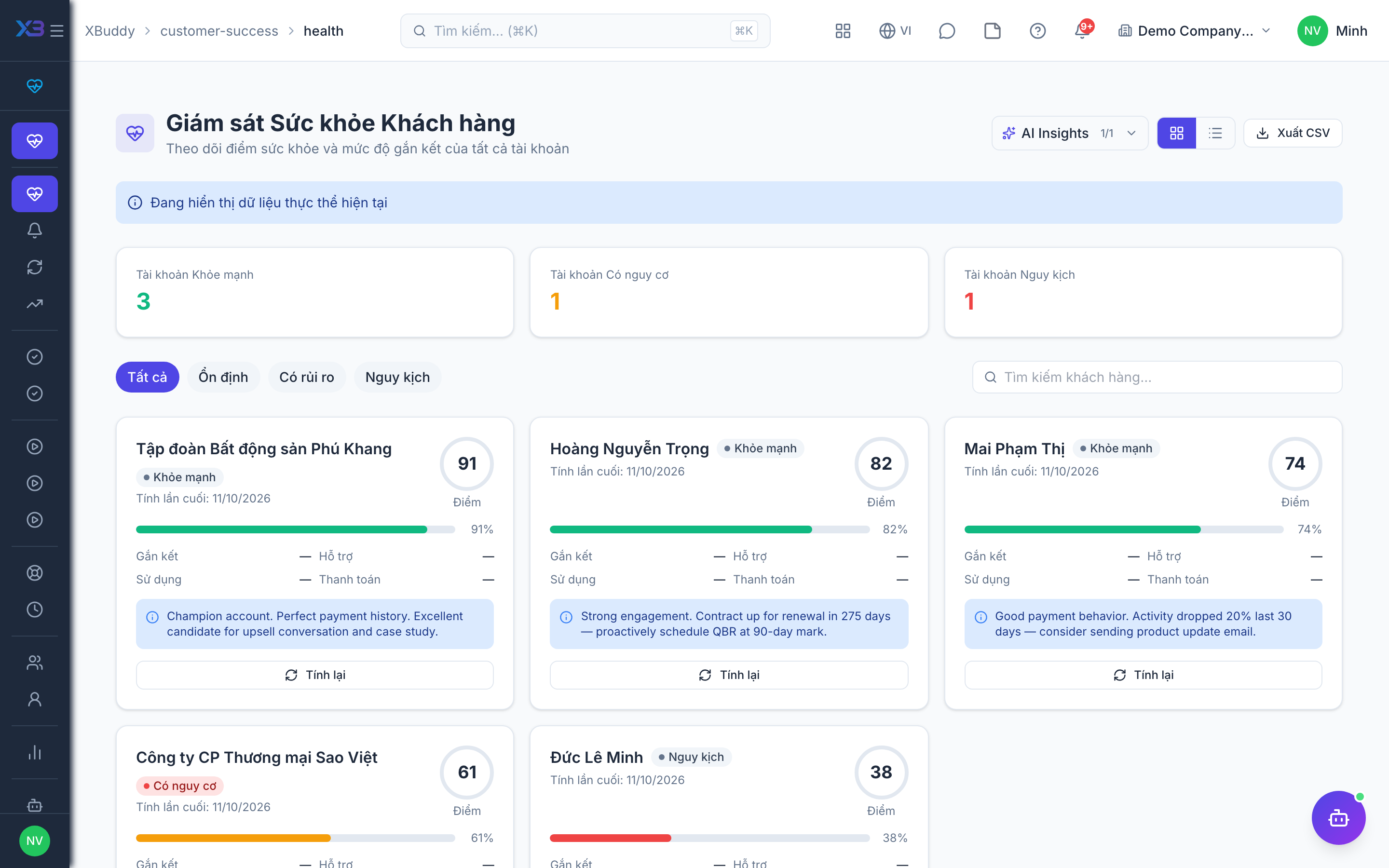
Customer Health scoring
A health score summarizes whether an account is thriving or at risk by blending signals — product usage, engagement recency, open tickets, and payment behavior — into one trend you can act on. Each signal contributes roughly a quarter of the score, and the weighting is configurable per tenant.
How it works: health is computed per contact, then rolled up to the account level for any contact linked to an organization. Whenever a computed score crosses a segment boundary — healthy, at risk, or critical — XBuddy records the change and, if the drop is significant, raises a health alert and can trigger a matching playbook automatically.
Open the health board
Go to Customer Success → Customer Health. Each account shows its current score, trend arrow, and the signals driving it.
Drill into an account
Click an account to see its health history and the specific factors pulling the score up or down.
Investigate a health score drop
Open the account’s health detail to see which signal moved — a spike in open tickets, a lapse in usage, or a payment issue — and check whether a health alert or playbook run already exists for it before starting your own outreach.
Act on risk
Low or declining scores surface a recommended play; the CS Guardian agent can propose a retention action inline on the account.