The task board and my tasks
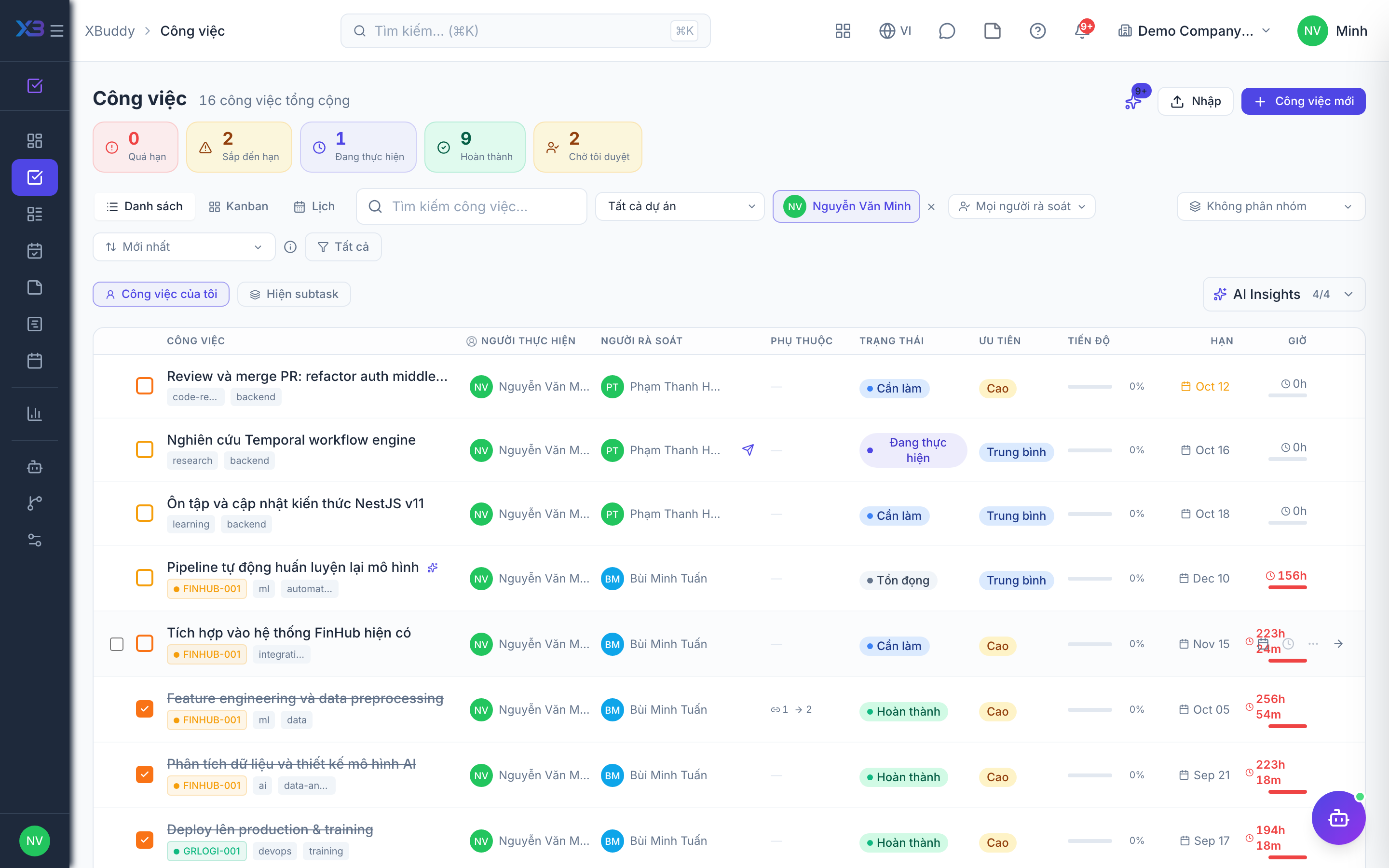
The Tasks side is where day-to-day work happens: a shared Kanban board plus a personal queue.
When to use
Use My Tasks to start your day and see what is assigned to you. Use the board when a team needs to see work flow from left to right, and the calendar when due dates matter more than status. Managers use All Tasks to find work that is late or unassigned.
Before you start
tasks:readlets you see tasks, the board, comments, and followers.tasks:writelets you create, edit, assign, change status, and import.tasks:deleteis needed to delete.- Tasks is free for every company; it does not need a paid pack.
tasks.advanced_management(off by default for existing companies, on for new ones) turns on the strict status matrix and the review workflow described in Task review and dependencies.tasks.subtask_inherit_defaults(on by default) makes sub-tasks start with the parent’s defaults.
Steps
Focus on your queue
Open My Tasks (/tasks) for the tasks assigned to you. It also includes tasks where you are a co-assignee and your team’s queue.
Work the board
Go to Kanban Board (/tasks/board) and drag tasks across columns such as To Do, In Progress, and Done. Columns reflect status.
Create a task
Choose New (/tasks/new). You can also create a sub-task under an existing task or clone a task. Assign a person and co-assignees, set the due date and priority.
Discuss and follow up
Open the task to comment. Type @ to tag someone who is the assignee, a participant, or a follower of the task. You can attach files and follow a task to get notified.
See everything and schedule
Use All Tasks (/tasks/all) for the full list with filters, and Task Calendar (/tasks/calendar) to view tasks by due date.
Import tasks from CSV
From the task list, use the import option to add many tasks at once. A single import accepts at most 500 rows.
Statuses
| Status | Meaning |
|---|---|
| To Do | Planned but not started. |
| In Progress | Someone is working on it. |
| Pending review | Submitted for review (when advanced task management is on). |
| Revision requested | A reviewer asked for changes. |
| Approved | A reviewer accepted the result. |
| Done | The work is complete. |
| Cancelled | Stopped. Cancelled tasks are hidden from boards and are not counted in progress. |
With tasks.advanced_management off, status changes are looser. With it on, only allowed transitions are offered.
Tips & common mistakes
- Use one status picker everywhere: the board, the list, and the task page all follow the same rules, so if a status is missing it is not an allowed transition.
- A comment with replies cannot be deleted until the replies are removed.
- A task that depends on another may warn or block you from starting it, depending on
tasks.dependency_start_policy(default: warn). - Project tasks and standalone tasks share the same board. Filter by project if the board feels crowded.
- Your private notes are not visible to managers; they are for you only.