The contract lifecycle
Every contract moves through defined stages so nothing sits in limbo and status is always clear to everyone involved.
When to use
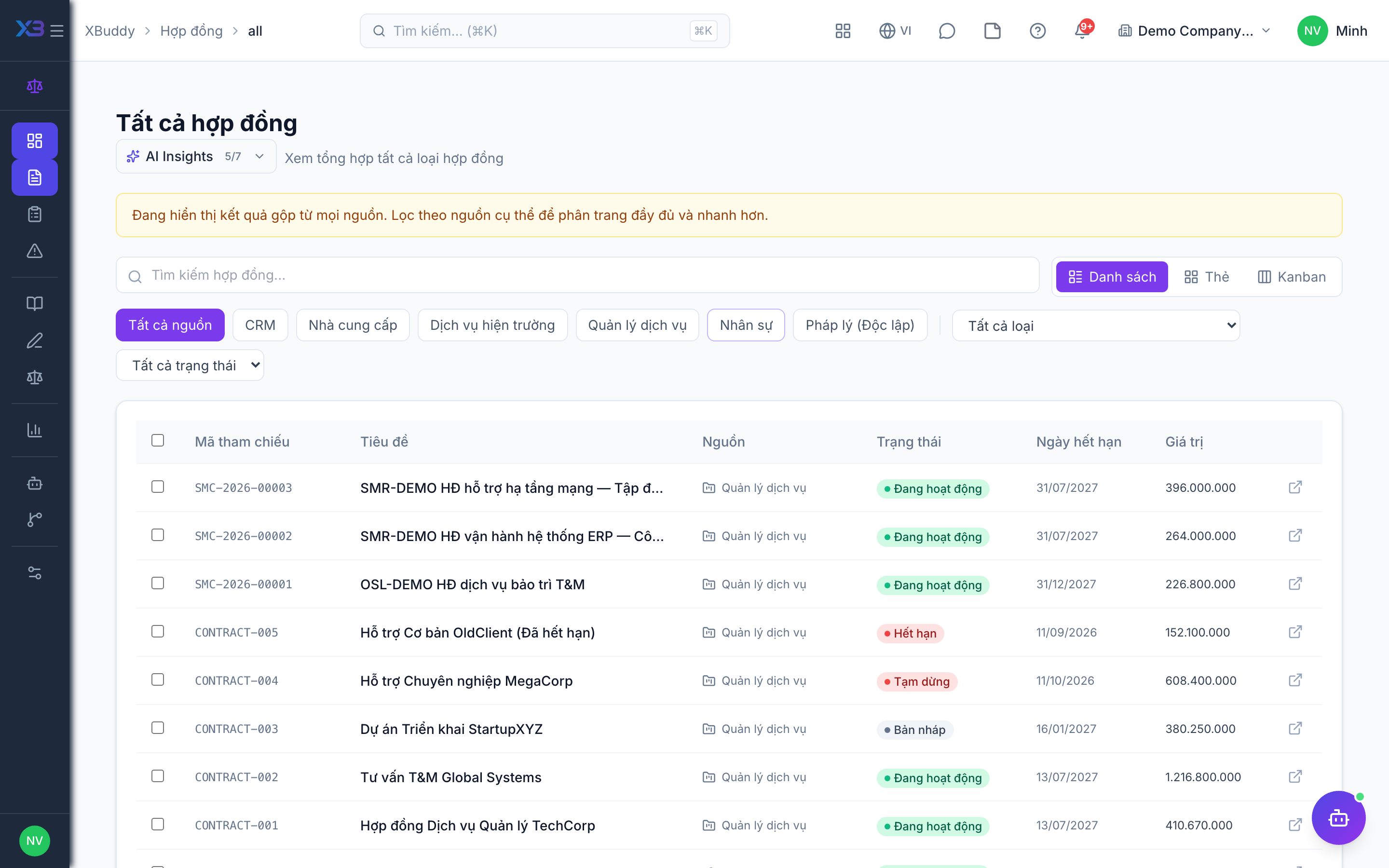
Use this page when you need to create, track, or close out an agreement. Contracts from CRM, Procurement, Field Service and Service Management are created in those apps and appear read-only in the All Contracts register; contracts that belong to none of them are created here as standalone contracts.
Before you start
- You need
contract_management:viewto see the register andcontract_management:manageto create or edit standalone contracts. - The toggle
legal.approval_required_before_active(on by default) means a standalone contract needs an approved legal review before it can be activated. - The toggle
legal.risk_blocks_activation(off by default) blocks activation while a severe clause risk is still open.
Steps
Draft the contract
Go to Contract Management → All Contracts and create a standalone contract (/contracts/standalone/new), drafting from a template or clause library, filling in parties, value, and term. Contracts of other kinds are created in their own app (CRM, Procurement, Field Service, Service Management).
Send for review
Move it to Pending Review; legal checks terms, and the AI assistant flags risky or non-standard clauses.
Approve
A reviewer with approval rights decides. The person who requested the review cannot approve it themselves.
Sign and activate
Once approved, request signatures. Standalone contracts record wet-ink signatures in the app; you can send reminders to signatories. When all signatures are in, the contract is executed and then becomes active.
Standalone contract statuses
| Status | Meaning |
|---|---|
| Draft | Being written; editable. |
| Pending review | Waiting for legal review. |
| Pending approval | Review done, waiting for an approver. |
| Pending signature | Approved and sent for signing. |
| Partially signed | Some, but not all, signatures recorded. |
| Executed | All signatures recorded. |
| Active | In force. |
| Expiring soon | Set automatically about 30 days before the end date. |
| Expired | Set automatically after the end date. |
| Terminated | Ended early; a reason is required. Possible from most live statuses. |
Tips & common mistakes
- Looking for a CRM or vendor contract to edit? The hub does not edit contracts from source apps; open the detail page and edit it in the source app.
- Platform e-signature is only available for the sources that support it; standalone contracts use wet-ink recording.
- Terminating a contract requires a reason, so have it ready.
- If activation is refused, check for an unapproved legal review or an open severe risk.
- Attach supporting files and use the contract timeline to keep the history in one place.